
What Is Lightpanda? The Zig Headless Browser for AI and Automation
Published on Recently
What Is Lightpanda? The Headless Browser Built for AI and Automation
Lightpanda is an open-source, lightweight headless browser built from scratch in the Zig programming language. Unlike traditional tools that wrap Chromium or WebKit, Lightpanda is designed specifically for machines. It delivers up to 9x faster execution and uses 16x less memory than Headless Chrome, making it the ideal engine for scalable web scraping, automated testing, and AI agent workflows.
The Problem with Traditional Headless Browsers
For years, developers have relied on Puppeteer, Playwright, or Selenium to automate web tasks. These tools are excellent, but they share a fundamental architectural flaw: they control full desktop browsers (like Chrome) that were built for humans, not servers.
When you scale web automation or AI agent tasks in the cloud, this human-centric design creates three major bottlenecks:
- Excessive Resource Consumption: Loading a full browser engine, complete with graphical rendering pipelines, consumes massive amounts of RAM and CPU.
- Slow Startup Times: Chrome can take seconds to initialize. Multiplied across thousands of concurrent scraping or testing jobs, this creates significant latency.
- Shared State Risks: Traditional browsers often carry persistent cookies, sessions, or cache between tasks, creating security and isolation vulnerabilities in multi-tenant environments.
Common Myth: "All headless browsers are just Chrome running without a UI."
Technical Reality: While that is true for most tools, it is a design choice that inherently limits scalability. Lightpanda challenges this by eliminating the graphical rendering layer entirely.
What Makes Lightpanda Different?
Lightpanda is not a Chromium fork or a patched version of WebKit. It is a completely new browser engine engineered from the ground up for headless operation.
Here is how it achieves its performance advantages:
- Written in Zig: Zig is a low-level system programming language designed for explicit memory control, safety, and peak performance. This allows Lightpanda to manage resources far more efficiently than higher-level languages.
- No Graphical Overhead: By skipping the GUI rendering pipeline, Lightpanda focuses purely on what automation scripts and AI agents actually need: the DOM, network requests, and JavaScript execution.
- V8 JavaScript Engine: Despite being lightweight, it fully supports modern JavaScript execution via the V8 engine, ensuring compatibility with dynamic, single-page applications (SPAs) built with React, Vue, or Angular.
Key Features for Developers and AI Engineers
Lightpanda is designed to drop seamlessly into existing automation stacks while offering native advantages for modern AI workflows.
- Chrome DevTools Protocol (CDP) Compatibility: Lightpanda exposes a CDP-compatible WebSocket server. This means you can often use existing Puppeteer or Playwright scripts with minimal to no modification.
- Native Agent Mode: Lightpanda includes a built-in agent command that allows you to drive the browser using plain English or slash commands. It integrates directly with major LLM providers (OpenAI, Anthropic, Gemini, Mistral, and local models via Ollama) to navigate pages, fill forms, and extract structured data.
- Model Context Protocol (MCP) Support: It features a native MCP server, allowing multiple AI agents to connect to independent, isolated browsing sessions (with separate cookies and memory) over HTTP or stdio without clobbering each other’s state.
- Advanced Network Control: Includes built-in support for proxy routing, custom HTTP headers, network interception, and the ability to automatically respect
robots.txtvia the--obey-robotsflag.
Lightpanda vs. Headless Chrome: Performance Comparison
Independent benchmarks highlight why infrastructure teams are evaluating Lightpanda for high-scale workloads. In a test requesting 933 real web pages over the network on an AWS EC2 m5.large instance, the performance gap between the two engines was stark:
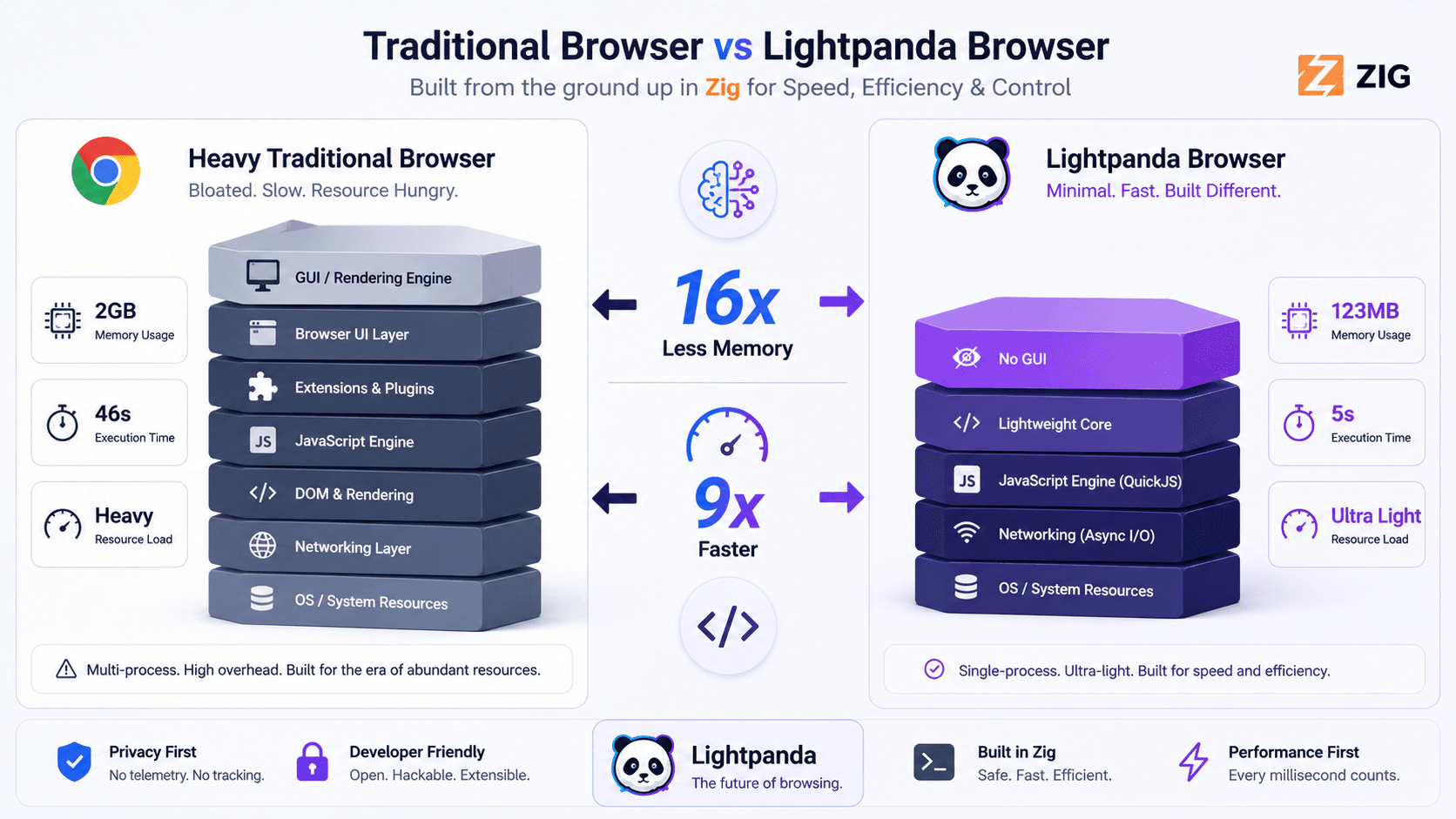
Peak Memory Usage (100 Pages):
Lightpanda consumed approximately 123 MB of memory, compared to Headless Chrome which required around 2 GB. This translates to Lightpanda using roughly 16x less memory.
Execution Time (100 Pages):
Lightpanda completed the task in about 5 seconds, whereas Headless Chrome took approximately 46 seconds to complete the same workload, making Lightpanda nearly 9x faster.
Note: Benchmarks vary based on page complexity and server configuration, but the architectural advantage of skipping GUI rendering consistently yields massive resource savings.
How to Get Started
Lightpanda is open-source and actively developed. You can explore the source code, review the roadmap, or contribute to the project on their official resources:
- Official Website & Documentation: Visit lightpanda.io for guides and quick-start instructions.
- GitHub Repository: Access the core codebase directly at the Lightpanda GitHub Repository.
- Underlying Technology: Learn more about the core language powering the engine at the official Zig Programming Language Website.
For Linux and macOS users, getting started is as simple as using the one-line installer provided in the official documentation, which downloads the pre-compiled binary directly to your environment.
Frequently Asked Questions
1. Is Lightpanda just a fork of Chromium?
No. Lightpanda is built entirely from scratch in the Zig programming language. It does not use Chromium, Blink, or WebKit, which is how it achieves its significantly smaller memory footprint and faster startup times.
2. Can I use my existing Puppeteer or Playwright scripts with Lightpanda?
Yes, in most cases. Lightpanda implements a Chrome DevTools Protocol (CDP) compatible WebSocket server. This allows many existing automation scripts to connect to and control Lightpanda just as they would a standard Chrome instance.
3. What is Lightpanda’s "Agent Mode"?
Agent Mode is a native feature that lets you control the browser using plain English prompts or slash commands. It connects directly to LLM APIs to perform actions like clicking, navigating, and data extraction, outputting deterministic "PandaScript" (vanilla JavaScript) that can be saved and run in production without ongoing LLM costs.
4. Does Lightpanda support JavaScript-heavy websites?
Yes. Lightpanda embeds the V8 JavaScript engine, meaning it can execute JavaScript, handle Ajax requests, and interact with the DOM just like a standard browser, making it suitable for modern single-page applications.
Conclusion
If your web automation, scraping, or AI agent workflows are being bottlenecked by the heavy resource demands of traditional browsers, Lightpanda offers a compelling, purpose-built alternative. By stripping away unnecessary graphical rendering and leveraging the performance of Zig, it delivers a faster, cheaper, and more secure headless browsing experience.
Before migrating your entire infrastructure, test Lightpanda alongside your current stack on a subset of your most resource-intensive tasks to measure the real-world savings in memory and execution time.