
Free Claude Code: The Ultimate Open-Source Proxy Guide for Developers
Published on Recently
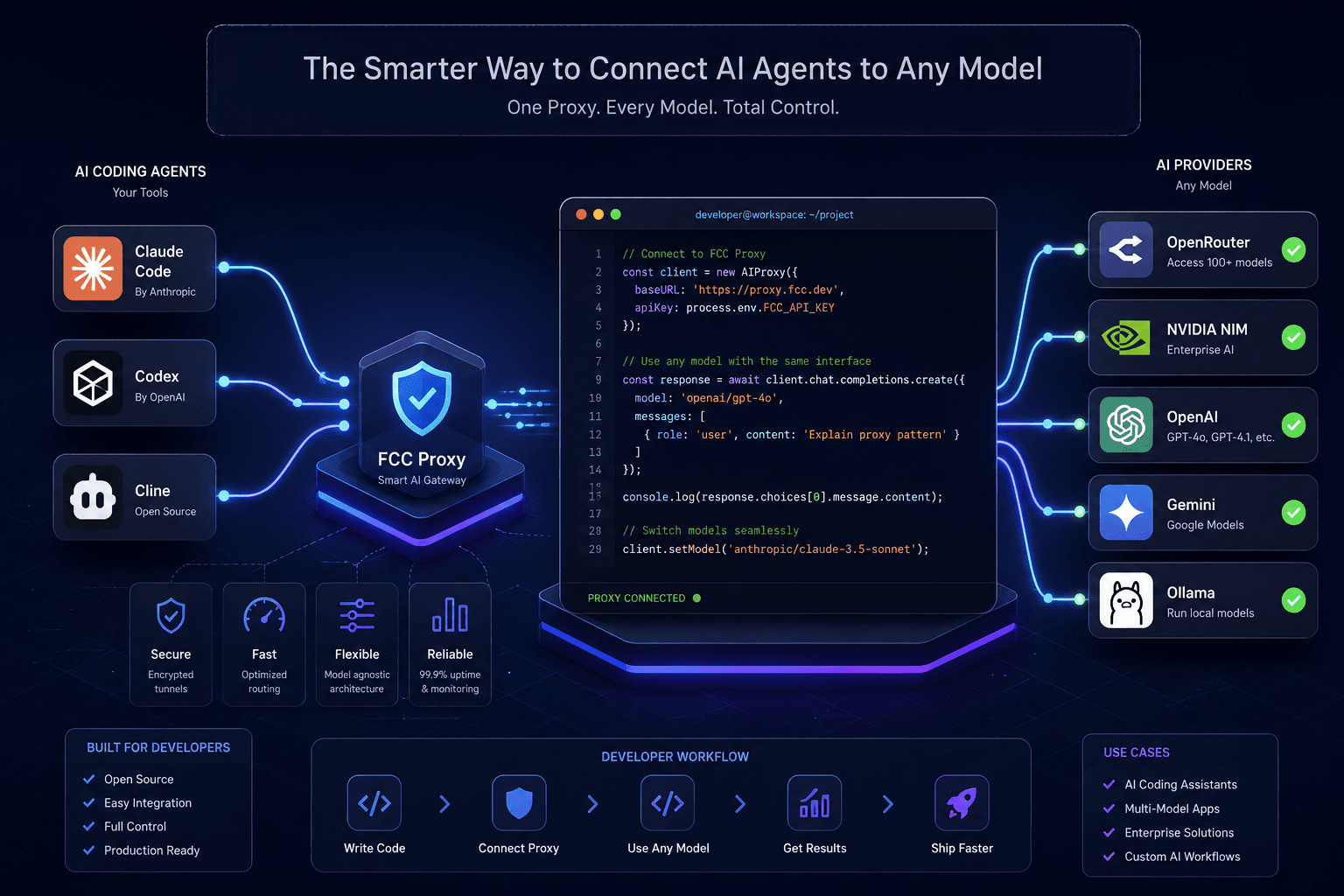
Free Claude Code: The Open-Source Proxy Guide for Developers
Free Claude Code (FCC) is an open-source local proxy tool available on GitHub that allows developers to run AI coding agents (like Claude Code, Codex, or Cline) by routing requests to alternative free-tier or open-source model providers. Instead of bypassing security, it legitimately aggregates access to dozens of ToS-friendly providers, helping you avoid paywalls and rate limits while keeping your development workflow intact.
What Is Free Claude Code (FCC)?
If you are a developer, student, or indie hacker, you have likely experienced the frustration of hitting strict API rate limits or subscription paywalls while trying to use premium AI coding assistants. You want the productivity boost of an AI pair programmer, but the costs or access barriers are prohibitive.
Free Claude Code (hosted by Alishahryar1 on GitHub) solves this specific problem. It is not a "crack" or an illegal bypass. Rather, it is a legitimate, independent open-source project that acts as a local middleware. It intercepts the API calls from your preferred coding agent and redirects them to other providers that offer free tiers, open-weight models, or local inference options.
If you are exploring advanced workflows, automated agents, or specialized AI environments, you can also check out our UltraWorkers Claw Code Guide for further deep dives.
How the Local Proxy Model Works
Understanding how FCC works is key to using it effectively and safely. When you run a command like claude in your terminal, the tool normally sends your code and prompts directly to Anthropic’s servers.
When you use Free Claude Code, the workflow changes slightly:
- Request Interception: You run an FCC-wrapped command (e.g.,
fcc-claude). - Local Processing: The local FCC server intercepts this request on your machine.
- Dynamic Routing: The proxy dynamically routes your prompt to a configured alternative provider—such as MindStudio, PromptsRush, OpenRouter, NVIDIA NIM, or a local Ollama instance.
- Streamed Response: The response is streamed back to your terminal or IDE, maintaining the native feel of the coding agent.
This architecture allows you to use a single, searchable model catalog across multiple coding agents without constantly swapping API keys or worrying about a single provider’s downtime.
Key Features for Developers
Based on the official project documentation on GitHub, Free Claude Code offers several practical benefits for daily development:
- Extensive Provider Network: Access to 50+ ToS-friendly providers, offering over 1.3 billion free tokens monthly by leveraging legitimate free tiers and open-source models.
- Multi-Agent Support: Run Claude Code, Codex, Pi, OpenCode, Cline, Hermes, DeepSeek Harness, Grok Build, Muse Code, or Aider through a unified interface.
- Automatic Failover: If one provider experiences an outage or rate limit, FCC automatically retries the request with your next configured model without forcing you to restart the conversation.
- Token Optimization: Optional RTK (Response Token Killer) filters can reduce terminal-output token usage by up to 90% by handling quota probes, command-prefix detection, and filepath formatting locally.
- Cross-Platform Flexibility: Works natively in the terminal, VS Code, JetBrains IDEs, Discord, Telegram, and even supports voice-to-code via local Whisper transcription.
Critical Security & Privacy Considerations
Common Myth: "Free Claude Code is an illegal hack of Anthropic’s systems that will get my account banned."
Reality: FCC is an independent, open-source proxy that is not affiliated with or endorsed by Anthropic. It does not steal credentials or bypass Anthropic’s authentication. Instead, it routes your traffic to other services.
However, this introduces a different set of considerations you must take seriously:
- Data Privacy: When you route your code through a third-party free tier, your code snippets and prompts are processed by that provider’s servers. Never send proprietary, confidential, or sensitive company code to unverified free-tier providers.
- Terms of Service: While FCC aims to be "ToS-friendly" by using allowed free tiers, you are still responsible for complying with the terms of service of whichever underlying provider you choose to route your traffic through.
- Local Security: Because the tool runs a local server (
fcc-server), ensure you enable Proxy Authentication with a bearer token in the Admin UI if you are working on a shared or networked machine.
For official guidelines on secure AI coding practices, refer to the official Anthropic Claude Code documentation.
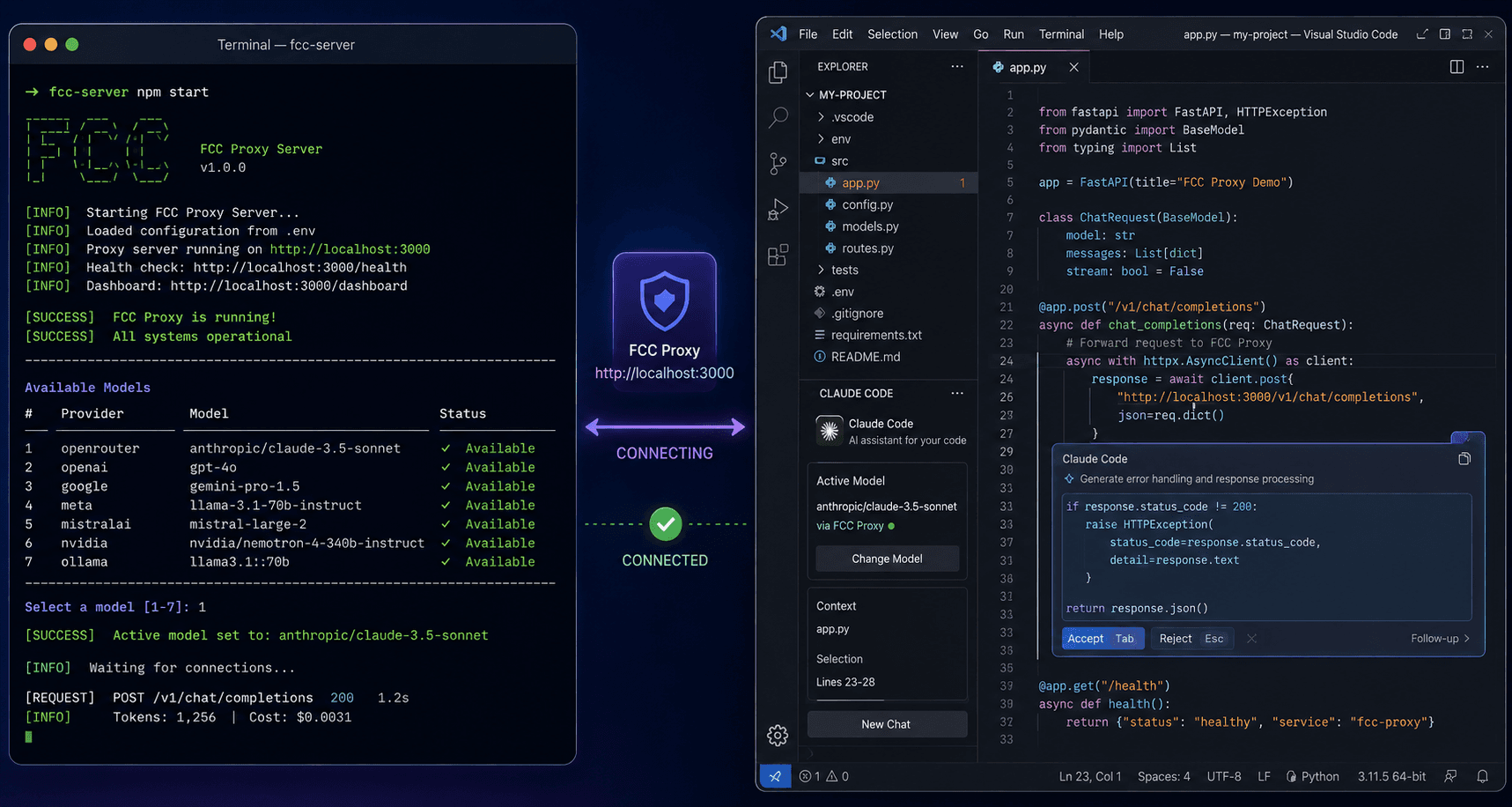
Quick Start Setup Guide
Getting started with Free Claude Code is straightforward. The project provides automated installation scripts for major operating systems.
Step 1: Install or Update
- For macOS/Linux:Open your terminal and run the installation script from the Free Claude Code Repository.
- For Windows:Open PowerShell and execute the setup script.
Note: You can review the install.sh and install.ps1 scripts on the official GitHub repository before executing them.
Step 2: Start the FCC Server
- Windows/macOS: Open "Free Claude Code" from your desktop, Start menu, or Applications folder. A tray or menu-bar icon will appear.
- Linux: Run
fcc-serverin your terminal and keep the window open.
Step 3: Run Your Coding Agent
Once the server is running, launch your preferred agent from the terminal:
fcc-claude(for Claude Code)fcc-codex(for OpenAI Codex)fcc-cline(for Cline)fcc-aider(for Aider)
You can then select your desired FCC-routed model directly from the coding agent’s native model picker.
Frequently Asked Questions
1. Is Free Claude Code safe to use?
Yes, the software itself is open-source and safe. However, safety also depends on how you use it. Because it routes your prompts to third-party providers, you should avoid inputting sensitive, proprietary, or personally identifiable information (PII) into unverified free-tier models.
2. Will using this proxy get my Anthropic account banned?
No. Free Claude Code does not interact with or authenticate through your Anthropic account. It routes requests to alternative providers (like OpenRouter or local models), so Anthropic has no visibility into or control over this traffic.
3. Does Free Claude Code work completely offline?
The FCC proxy server runs locally on your machine, but it still requires an internet connection to route your requests to the external free-tier providers or APIs. If you want a fully offline experience, you must configure FCC to route exclusively to a local model runner like Ollama.
4. Can I use Free Claude Code in VS Code or other IDEs?
Yes. FCC is designed to integrate seamlessly with terminal-based workflows, VS Code extensions, JetBrains IDEs, and even chat platforms like Discord and Telegram. You simply point your IDE’s AI coding extension to the local FCC proxy endpoint.
Conclusion
Free Claude Code is a powerful, resourceful tool for developers who want to leverage advanced AI coding agents without being blocked by paywalls or strict rate limits. By acting as a smart local proxy, it aggregates access to dozens of legitimate, free-tier providers while maintaining the native functionality of tools like Claude Code and Cline.
However, with great flexibility comes the responsibility of data stewardship. Always verify the data policies of the underlying providers you route your traffic through, and never compromise your organization’s security by sending confidential code to unvetted services. When used thoughtfully, FCC can significantly enhance your coding productivity while keeping your budget intact.