
Google Whisk AI App: Everything You Need to Know
Google Whisk (package name com.google.android.apps.labs.whisk) is an experimental mobile tool developed by Google Labs. It allows creators to generate and remix visuals using image-based prompting—combining a subject, scene, and artistic style—rather than relying solely on complex text instructions.
What Is Google Labs Whisk?
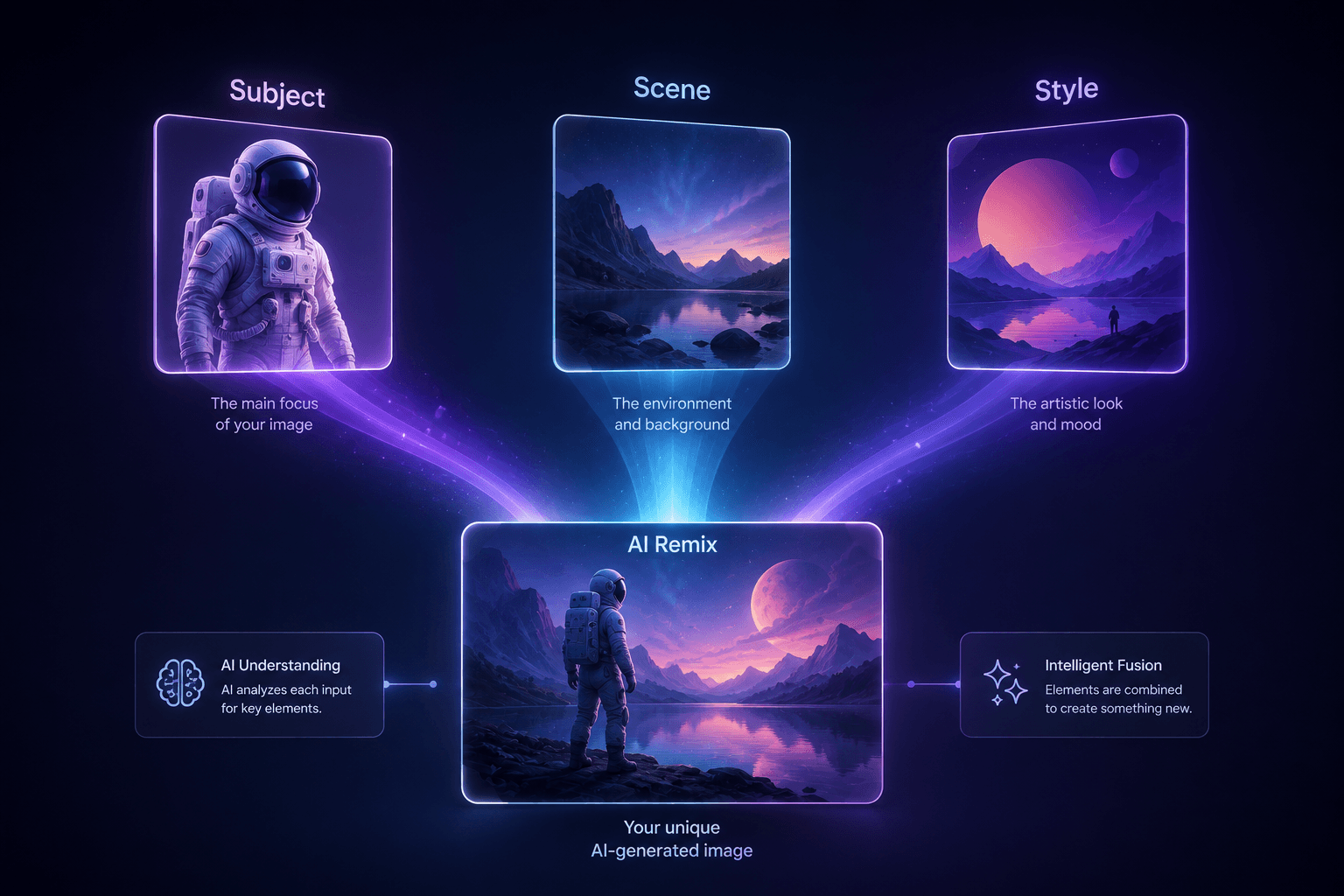
Whisk is an AI image generation experiment designed to make digital art creation visual-first. Traditional AI image models require users to engineer descriptive text prompts. Whisk changes this paradigm by using up to three reference photos as primary inputs:
Subject: The main character, object, or item.
Scene: The background, location, or environment.
Style: The overall aesthetic, texture, or art medium (such as sticker, watercolor, or enamel pin).
By blending these three distinct visual layers, the generative engine produces a brand-new, cohesive image that preserves key elements from each input.
Key Features of the Whisk App
- Three-Input Image Blending: Combine subject, background, and aesthetic elements without writing lengthy text prompts.
- Built-in Aesthetic Presets: Select quick preset styles—including plushies, stickers, chocolate box art, and 3D toys—for rapid prototyping.
- Optional Text Guidance: Add short text adjustments to fine-tune motion, color palettes, or specific details.
- Fast Creative Iteration: Ideal for mood-boarding, concept art, and social media content creation.
- Safety & Moderation: Built-in safeguards check generations against Google AI Principles to block inappropriate outputs.
How to Use Whisk to Remix Visuals
Generating custom AI imagery using Google Whisk requires four basic steps:
Upload a Subject: Select or snap a reference photo featuring the main focus of your image.
Choose a Scene: Add a background image to define the setting.
Apply a Style: Choose an artistic style reference image or select a built-in preset.
Generate: Tap generate to synthesize the three visual inputs into a single new output.
Frequently Asked Questions
Is the Google Whisk app free to use?
Yes, Whisk is hosted as a free experimental project via Google Labs. Features and availability may evolve as the tool moves beyond its experimental research phase.
Do I need to write complex text prompts to use Whisk?
No. Whisk prioritizes image-to-image blending, meaning you can drag and drop visual references to guide the AI output instead of engineering long text prompts.
Where can I download the official Whisk Android app?
The official application is available through Google Play and accessible via web browsers on Google Labs.
Conclusion
Google Whisk represents a shift toward visual-first generative AI tools. By replacing complex text prompting with a simple subject, scene, and style framework, it gives creators, designers, and casual users an intuitive way to experiment with digital image remixing.
Evaluation: Is This Tool Best?
Verdict: Excellent for visual conceptualization, but not a full replacement for production-grade image tools.
- Why it shines: Whisk is one of the best tools for creators who struggle with complex text prompting. Instead of spending minutes crafting detailed descriptors, uploading 2-3 visual references yields quick, predictable results.
- Where it falls short: Because it operates as an experimental Google Labs project, fine-grained editing and ultra-high-resolution canvas exports may be limited compared to full-fledged professional tools like Midjourney or Photoshop Generative Fill.